
 Benjamin
 Streaming has changed the way we watch television. Instead of paying for expensive cable packages, you can access thousands of films, TV shows, live sports, music, and apps from a single device. That’s exactly what the Amazon Fire TV Stick offers.
Here’s the thing. Buying a Fire TV Stick isn’t as simple as choosing the cheapest option or the latest model. Amazon offers several versions, each designed for different viewing habits, budgets, and TV setups. Spending more doesn’t always mean you’re getting better value, especially if you’ll never use the extra features.
If you’re watching Netflix after work, catching up on BBC iPlayer at weekends, or turning an older television into a smart TV, there’s a Fire TV Stick that fits your needs without stretching your budget.
This guide explains the differences between each model, what features actually matter, and where it’s worth spending a little extra. By the end, you’ll know exactly which Fire TV Stick Subscription UK offers the best value for your money.
Quick Answer: Which Fire TV Stick Should You Buy?
If you’re short on time, here’s a simple breakdown.
| Your Budget | Recommended Model | Best For |
| Under £40 | Fire TV Stick HD | Casual streaming and older televisions |
| £40 to £60 | Fire TV Stick 4K | Most households looking for the best balance of price and performance |
| £60+ | Fire TV Stick 4K Max | Heavy streamers, gamers, and those wanting the fastest experience |
For most people in the UK, the Fire TV Stick 4K offers the best overall value. It supports stunning picture quality, loads apps quickly, and should remain a solid choice for years without costing significantly more than the entry-level model.
What Is a Fire TV Stick?
A Fire TV Stick is a compact streaming device that plugs directly into your television’s HDMI port. Once connected to your home Wi-Fi, it gives you access to thousands of streaming apps, games, music services, and live TV platforms.
Think of it as giving your television a major upgrade.
Instead of switching between different devices, you can watch films on Netflix, stream football through supported apps, listen to Spotify, browse YouTube, or ask Alexa to find your favourite programme using your voice.
One of the biggest advantages is simplicity. Everything lives in one place, so you don’t have to jump between different inputs or remotes.
Popular apps available include:
- Netflix
- Prime Video
- Disney+
- BBC iPlayer
- ITVX
- Channel 4
- My5
- YouTube
- Spotify
- Apple TV+
- NOW
- Paramount+
Unlike many built-in Smart TV systems, Fire TV receives regular software updates, new features, and improved app support. Even if your television is several years old, a Fire TV Stick can make it feel modern again.
How Does a Fire TV Stick Work?
The setup is surprisingly straightforward.
Plug the device into an available HDMI port, connect the power cable, pair the Alexa Voice Remote, and join your Wi-Fi network. After signing into your Amazon account, you’ll have access to the Fire TV interface.
From there, you can install streaming apps, sign into your subscriptions, download games, and even control compatible smart home devices.
Because everything runs through the Fire TV operating system, the performance depends more on the streaming stick than the television itself. That’s one reason many people prefer using a Fire TV Stick instead of relying on older Smart TV software.
Who Should Buy a Fire TV Stick?
A Fire TV Stick isn’t just for people without a Smart TV.
It’s a good choice if you:
- Own an older television that lacks streaming apps
- Find your current Smart TV slow or frustrating
- Want a faster interface
- Already use Amazon Alexa devices
- Travel regularly and want your favourite streaming services with you
- Need access to UK catch-up services in one place
- Prefer voice search instead of typing with a remote
Many people replace perfectly good Smart TV software simply because Fire TV offers a smoother experience and receives updates for much longer.
Why Your Budget Matters When Buying a Fire TV Stick
It’s easy to assume the most expensive model is automatically the best choice. In reality, that’s rarely true.
What matters is paying for features you’ll actually use.
Let’s break down where your money goes.
Picture Quality
If your television only supports Full HD resolution, buying the most expensive 4K streaming stick won’t suddenly improve the picture.
On the other hand, if you’ve recently invested in a modern 4K television, choosing a cheaper HD-only model means you’re missing out on sharper images, richer colours, and HDR support.
Matching the Fire TV Stick to your television makes much more sense than buying based on price alone.
Performance
Every Fire TV Stick uses a different processor.
Entry-level models handle everyday streaming comfortably, but premium versions open apps faster, switch between menus more smoothly, and respond quicker when using Alexa.
If you’re someone who constantly jumps between Netflix, YouTube, BBC iPlayer, and Prime Video, those small speed improvements become noticeable every day.
Wi-Fi Technology
Streaming quality depends on more than your broadband speed.
Newer Fire TV Stick models support faster wireless standards, making them better at handling 4K streaming, cloud gaming, and busy households where several devices are connected at the same time.
If your internet connection is already fast, an older Wi-Fi standard could become the bottleneck.
Audio and Video Features
Higher-priced Fire TV Sticks usually include support for premium formats such as Dolby Vision and Dolby Atmos.
These technologies improve picture detail and surround sound, but only if your television or sound system supports them.
If your setup doesn’t, paying extra won’t bring much benefit.
Future Value
Here’s something many buyers overlook.
A slightly more expensive Fire TV Stick often stays useful for longer.
Better hardware means future software updates are less likely to slow the device down. Instead of replacing it after a couple of years, you could comfortably use it for much longer.
That can make the higher upfront cost better value over time.
Fire TV Stick Models Explained
Amazon currently offers several Fire TV Stick models, each aimed at different types of users.
Rather than focusing only on specifications, let’s look at where each one fits in real life.
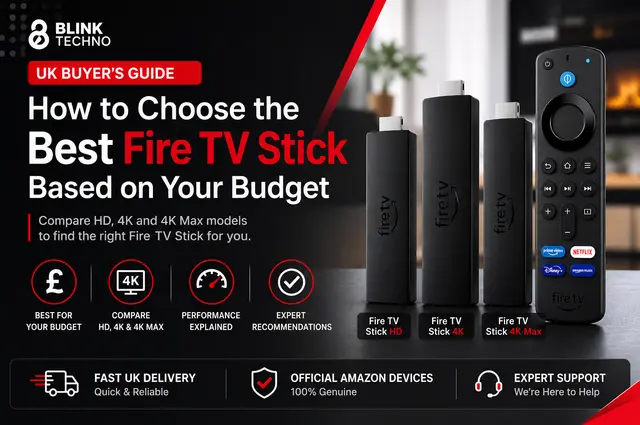
Fire TV Stick HD
Best for Budget Buyers
The Fire TV Stick HD is Amazon’s most affordable streaming device.
It’s designed for people who simply want reliable streaming without paying for features they’ll never use.
If your television has a Full HD display rather than 4K resolution, this model covers the basics well.
You can stream films, browse YouTube, catch up with BBC programmes, and control playback using Alexa.
Key Benefits
- Affordable price
- Simple setup
- Reliable Full HD streaming
- Voice remote included
- Access to thousands of streaming apps
Things to Consider
It doesn’t support 4K playback, Dolby Vision, or some of the premium features found in more expensive models.
Navigation is perfectly usable but not as quick as newer devices.
Ideal For
- Students
- Spare bedrooms
- Holiday homes
- Older televisions
- Light streaming
If your viewing habits are fairly straightforward, spending more probably isn’t necessary.
Fire TV Stick 4K
Best Value for Most UK Households
For many people, this is the sweet spot.
The Fire TV Stick 4K strikes an excellent balance between affordability and performance. It delivers noticeably faster navigation than entry-level models while supporting advanced picture formats that make modern televisions look their best.
Whether you’re watching Premier League highlights, blockbuster films, or nature documentaries, the improved detail is easy to appreciate on a compatible television.
The stronger processor also makes everyday use feel smoother.
Menus respond quickly.
Apps launch faster.
Searching with Alexa feels more responsive.
These aren’t dramatic differences on paper, but over months of daily use they make the experience much more enjoyable.
Key Benefits
- 4K Ultra HD support
- HDR10 and HDR10+
- Dolby Vision compatibility
- Dolby Atmos support
- Faster processor
- Excellent value for money
Things to Consider
If you only own a Full HD television, you won’t see the full benefit of its video capabilities.
Ideal For
- Families
- Everyday streaming
- New Smart TVs
- Film lovers
- Sports fans
- Anyone upgrading from an older Fire TV Stick
For most buyers, this is the model that offers the strongest mix of performance, longevity, and price.
Fire TV Stick 4K Max
Built for Power Users
The Fire TV Stick 4K Max sits at the top of Amazon’s streaming range.
It’s designed for people who expect more from their streaming device than simply watching Netflix.
Everything feels quicker.
Apps load faster.
Navigation is smoother.
Multitasking is more responsive.
It also supports newer wireless technology, making it better suited to households with multiple connected devices and high-speed broadband.
If you’re interested in cloud gaming or frequently stream high-quality 4K content, the extra performance becomes worthwhile.
For casual viewing, though, the difference is less noticeable.
That’s why it isn’t automatically the best choice for everyone.
Key Benefits
- Fastest processor in the Fire TV Stick range
- Excellent 4K performance
- Advanced Wi-Fi support
- Improved gaming capability
- Better long-term value
Ideal For
- Gamers
- Heavy streamers
- Smart home users
- Large households
- Home cinema enthusiasts
If you’re buying a streaming device you’ll use every day for several years, the extra investment may be worthwhile. If your viewing habits are more relaxed, the standard Fire TV Stick 4K often delivers better overall value.
Fire TV Stick Comparison: Which Model Gives You the Best Value?
Looking at specifications alone doesn’t always help. A faster processor or a newer Wi-Fi standard sounds impressive, but what matters is how those features improve your day-to-day viewing experience.
The table below highlights the differences that most buyers actually care about.
| Feature | Fire TV Stick HD | Fire TV Stick 4K | Fire TV Stick 4K Max |
| Best For | Everyday HD streaming | Most UK households | Power users and gamers |
| Maximum Resolution | Full HD 1080p | 4K Ultra HD | 4K Ultra HD |
| HDR Support | No | Yes | Yes |
| Dolby Vision | No | Yes | Yes |
| Dolby Atmos | Limited support | Yes | Yes |
| Processor | Standard | Faster | Fastest |
| Wi-Fi | Dual-band | Faster wireless support | Latest wireless technology |
| Alexa Voice Remote | Included | Included | Included |
| Cloud Gaming | Basic | Good | Best |
| Value for Money | Good | Excellent | Premium |
If you’re still deciding, don’t focus only on technical specifications. Think about how you’ll actually use the device.
For someone watching BBC iPlayer a few evenings a week, the Fire TV Stick HD could be more than enough. If you’re streaming 4K films every night, switching between multiple apps and using Alexa throughout the day, the Fire TV Stick 4K or 4K Max will feel noticeably smoother.
Which Fire TV Stick Is Best for Your Budget?
Your budget should help narrow the options rather than limit them. Spending wisely isn’t about buying the cheapest model. It’s about getting the features you’ll actually benefit from.
Let’s look at each price range.
Budget Under £40
Best Choice: Fire TV Stick HD
If you’re shopping on a tighter budget, the Fire TV Stick HD offers excellent value.
It covers everything most casual users need without adding features that increase the price unnecessarily.
You’ll still have access to popular streaming services, voice search with Alexa, music apps, live TV services, and thousands of additional apps from Amazon’s Appstore.
This model is ideal if you:
- Own an HD television
- Mainly watch Netflix or BBC iPlayer
- Need a second streaming device
- Want to replace slow Smart TV software
- Don’t plan on upgrading to a 4K television soon
For many people, it’s a simple and affordable way to modernise an older television.
Budget Between £40 and £60
Best Choice: Fire TV Stick 4K
This is where most buyers should focus.
The Fire TV Stick 4K delivers a noticeable improvement in speed, picture quality and long-term value without costing significantly more than the entry-level model.
Here’s what you gain.
- Sharper 4K resolution
- Better HDR support
- Improved Dolby Vision compatibility
- Faster app loading
- Smoother navigation
- Better overall performance
Even if you don’t watch 4K content every day, the improved processor alone makes the experience more enjoyable.
It’s the model that strikes the best balance between affordability and future-proofing.
Budget Over £60
Best Choice: Fire TV Stick 4K Max
If your budget allows for it, the Fire TV Stick 4K Max offers Amazon’s fastest streaming experience.
The improvements aren’t just about speed.
The interface feels more responsive.
Apps open almost instantly.
Voice commands work faster.
Streaming remains stable even when multiple devices are using your home network.
If your television supports premium picture and audio formats, you’ll get the most from films, sports and documentaries.
However, here’s the important point.
If you only stream a few hours each week, you may never notice enough difference to justify the extra cost.
Best Fire TV Stick by User Type
Not everyone uses a streaming device in the same way.
Choosing based on your viewing habits often leads to a better purchase than choosing based on specifications.
Best for Beginners
Recommended: Fire TV Stick HD
If you’ve never owned a streaming device before, this model keeps everything simple.
The interface is easy to understand, Alexa helps you find programmes quickly, and installation takes only a few minutes.
Best for Families
Recommended: Fire TV Stick 4K
Families often switch between children’s programmes, films, sport and catch-up television.
The faster processor handles frequent app switching much better than the entry-level model.
It also supports higher-quality streaming for family movie nights.
Best for Students
Recommended: Fire TV Stick HD
Students usually want something affordable that works well in smaller rooms or shared accommodation.
The Fire TV Stick HD delivers everything needed without stretching a limited budget.
Best for Film Lovers
Recommended: Fire TV Stick 4K
If you’ve invested in a good television, it makes sense to enjoy films in the highest quality available.
Support for Dolby Vision and Dolby Atmos helps create a much more immersive viewing experience.
Best for Sports Fans
Recommended: Fire TV Stick 4K
Live football, rugby and Formula One all benefit from smoother playback and sharper picture quality.
The faster processor also makes navigating between live events much easier.
Best for Gamers
Recommended: Fire TV Stick 4K Max
Cloud gaming demands more from your streaming device than watching television.
The extra processing power and newer wireless technology make the 4K Max the strongest option for gaming.
Best for Smart Home Users
Recommended: Fire TV Stick 4K Max
If you already use Alexa-enabled speakers, smart lighting or security cameras, the 4K Max integrates particularly well into a connected home.
Voice commands feel quicker, and controlling compatible devices becomes more convenient.
Features Worth Paying Extra For
Not every premium feature is worth the additional cost.
These ones usually are.
Faster Processor
You’ll notice this every single day.
A quicker processor means faster menus, smoother scrolling, shorter loading times and fewer delays when switching between apps.
Unlike some technical features, this improvement is obvious almost immediately.
4K Resolution
If you own a compatible television, choosing a 4K streaming device makes perfect sense.
Images appear sharper, textures become clearer and overall picture quality improves.
If your television only supports Full HD, however, this feature becomes much less important.
Dolby Vision
Dolby Vision enhances brightness, contrast and colour accuracy where supported.
Films look richer.
Dark scenes reveal more detail.
Highlights appear more realistic.
If your television supports Dolby Vision, it’s one of the easiest ways to improve your viewing experience.
Dolby Atmos
Great picture deserves great sound.
Dolby Atmos creates a more immersive audio experience by adding greater depth and direction to supported content.
You’ll benefit most if you already own a compatible soundbar or home cinema system.
Better Wireless Performance
Busy households often have dozens of connected devices.
Phones.
Tablets.
Laptops.
Gaming consoles.
Smart speakers.
Doorbells.
Security cameras.
Choosing a Fire TV Stick with improved wireless capability helps maintain smoother streaming, particularly during busy evenings.
Features You Can Skip to Save Money
Not every feature deserves a bigger budget.
Depending on your setup, you could save money without losing anything important.
Premium Picture Formats on an Older TV
Buying a Fire TV Stick with Dolby Vision won’t improve picture quality if your television doesn’t support it.
The same applies to 4K resolution.
Always match the streaming device to the television you already own.
Advanced Gaming Features
If your streaming device is mainly used for films and television, paying extra for gaming performance doesn’t offer much practical value.
High-End Wireless Standards
People with slower broadband connections may never notice the advantages of the latest wireless technology.
In many homes, internet speed itself remains the limiting factor.
Paying for Features You’ll Never Use
It’s surprisingly common for buyers to purchase the most expensive model simply because it’s labelled as the best.
In reality, the best Fire TV Stick is the one that suits your viewing habits.
If you never watch 4K content, don’t own premium audio equipment and rarely use Alexa, a mid-range model may offer far better value.
How to Make the Right Choice
Before placing your order, ask yourself these simple questions.
- Does my television support 4K resolution?
- How often do I stream films or television?
- Do I already use Alexa devices?
- Will I use cloud gaming?
- Do I plan to upgrade my television in the next few years?
- Am I buying for everyday use or occasional streaming?
Answering these honestly makes choosing much easier.
For most households, the Fire TV Stick 4K remains the strongest all-round choice because it balances price, performance and future value exceptionally well.
If your needs are simpler, the Fire TV Stick HD still offers excellent performance at a lower price.
And if you want the fastest streaming experience Amazon currently offers, the Fire TV Stick 4K Max is well worth considering.
Fire TV Stick vs Smart TV Apps: Is a Fire TV Stick Still Worth Buying?
One of the most common questions people ask is whether a Fire TV Stick is necessary if they already own a Smart TV.
The short answer is yes, in many cases.
While most modern televisions come with built-in streaming apps, the experience isn’t always as smooth as you’d expect. Smart TV software can become sluggish over time, receive fewer updates and offer a limited selection of apps compared to dedicated streaming devices.
A Fire TV Stick is designed specifically for streaming. It receives regular software updates, introduces new features more frequently and gives you access to a wider range of entertainment apps.
Here’s a quick comparison.
| Feature | Fire TV Stick | Built-in Smart TV Apps |
| Speed | Fast and responsive | Can slow down over time |
| Software Updates | Regular updates from Amazon | Depends on the TV manufacturer |
| App Selection | Extensive | Varies by brand |
| Voice Control | Alexa Voice Remote included | Limited on some TVs |
| Portability | Can be moved between TVs | Fixed to one television |
| Future Support | Generally longer | Often ends after a few years |
If your Smart TV is only a couple of years old, you may already be happy with its performance. However, if apps take longer to open, freeze occasionally or stop receiving updates, a Fire TV Stick can make the television feel new again without replacing the entire set.
Fire TV Stick vs Roku vs Google Chromecast
Amazon isn’t the only company making streaming devices. Roku and Google Chromecast are also popular options, each with their own strengths.
So, how do they compare?
| Feature | Fire TV Stick | Roku | Google Chromecast |
| Voice Assistant | Alexa | Roku Voice | Google Assistant |
| App Library | Excellent | Excellent | Excellent |
| UK Streaming Services | Excellent | Excellent | Excellent |
| Smart Home Integration | Best with Alexa | Basic | Best with Google Home |
| Ease of Use | Very easy | Simple | Easy |
| Best For | Amazon users and general streaming | Straightforward streaming | Google ecosystem users |
Fire TV Stick
A Fire TV Stick works particularly well if you already use Amazon services. Alexa voice control, Prime Video and smart home integration all work together naturally.
The interface is easy to navigate, app support is excellent and setup takes only a few minutes.
Roku
Roku focuses on simplicity.
It’s a good option for users who want a straightforward interface without many additional features. It supports most major UK streaming services and performs reliably for everyday viewing.
Google Chromecast
Chromecast is an excellent choice for households already using Android phones, Google Nest speakers or other Google devices.
Casting content from your phone is particularly simple, and Google Assistant integrates well with supported smart home products.
Which One Offers the Best Value?
For most people in the UK, the Fire TV Stick remains the strongest all-round option.
It combines a wide app selection, excellent voice search, regular software updates and competitive pricing.
If you’re already invested in the Amazon ecosystem, it becomes an even easier recommendation.
Common Mistakes to Avoid When Buying a Fire TV Stick
Buying a streaming device isn’t difficult, but a few common mistakes can leave you spending more than necessary or choosing the wrong model.
Here are the ones worth avoiding.
Buying a 4K Model for an HD Television
This is probably the most common mistake.
If your television only supports Full HD, you won’t benefit from 4K streaming or Dolby Vision.
A Fire TV Stick HD may provide everything you need at a lower price.
Choosing the Cheapest Option Without Thinking Ahead
Saving money is sensible, but replacing a streaming device after two years isn’t.
If you’re planning to upgrade to a 4K television soon, buying a Fire TV Stick 4K now could save money in the long run.
Ignoring Your Internet Connection
Even the fastest Fire TV Stick can’t compensate for slow broadband.
For smooth 4K streaming, you’ll need a stable internet connection with enough speed to handle high-quality video.
If your broadband struggles with HD streaming, upgrading your internet package may have a bigger impact than buying a premium streaming device.
Forgetting About Audio Equipment
Many premium Fire TV Stick features are designed to work alongside compatible sound systems.
If you’re using your television’s built-in speakers, you may not notice the full benefit of advanced audio technologies such as Dolby Atmos.
Buying Based on Specifications Alone
It’s easy to get caught up comparing processors, wireless standards and technical features.
What really matters is how you’ll use the device.
Someone watching a few hours of catch-up television each week doesn’t need the same streaming hardware as someone watching 4K films every evening.
Our Expert Recommendations
After comparing performance, value and everyday usability, these are our top picks.
Best Overall
Amazon Fire TV Stick 4K
This is the model we’d recommend to most people.
It delivers fast performance, excellent picture quality and support for premium audio and video formats without pushing the price too high.
For most UK households, it offers the best balance of features and value.
Best Budget Choice
Amazon Fire TV Stick HD
If your budget is limited or you own a Full HD television, the Fire TV Stick HD remains a smart purchase.
It covers all the essentials and provides excellent value for everyday streaming.
Best Premium Choice
Amazon Fire TV Stick 4K Max
If you want Amazon’s fastest streaming experience, this is the model to choose.
It’s particularly suited to large households, cloud gaming, home cinema setups and users who expect the best possible performance.
Best Value for Money
Amazon Fire TV Stick 4K
When price, performance and longevity are considered together, the Fire TV Stick 4K comes out on top.
It avoids unnecessary extras while offering meaningful upgrades over the HD model.
Final Thoughts
Choosing the best Fire TV Stick doesn’t have to be complicated.
The right model depends on your television, your viewing habits and how much you’re comfortable spending.
If you’re looking for the lowest upfront cost, the Fire TV Stick HD covers all the essentials for everyday streaming.
If you want the best mix of price, performance and long-term value, the Fire TV Stick 4K is the clear winner. It offers meaningful upgrades that most households will notice without moving into premium pricing.
If you stream every day, enjoy 4K films, use Alexa throughout your home or want the fastest experience available, the Fire TV Stick 4K Max is a worthwhile investment.
Before making your decision, compare the latest prices, consider the features you’ll actually use and choose the model that matches both your budget and your entertainment needs. A little planning now can save money and ensure you enjoy a smoother streaming experience for years to come.
Frequently Asked Questions
The Fire TV Stick 4K is the best choice for most UK households. It offers excellent picture quality, fast performance and support for modern audio and video formats without the premium price of the 4K Max.
Yes, especially if your Smart TV feels slow or no longer receives regular software updates. A Fire TV Stick often delivers a faster interface, broader app support and a better overall streaming experience.
Absolutely. An Amazon Prime subscription isn’t required to use a Fire TV Stick. You can install and use services such as Netflix, Disney+, BBC iPlayer, ITVX, YouTube, Spotify and many other compatible apps.
If you own a 4K television, the Fire TV Stick 4K is usually the best choice.
If you want the fastest performance available or plan to use cloud gaming and advanced smart home features, the Fire TV Stick 4K Max is worth considering.
A Fire TV Stick works with most televisions that include an HDMI port.
Older televisions may also require access to a USB power source or the included power adapter.
Yes. Many UK streaming services provide access to live television, sports and news. Additional live TV options are also available through compatible streaming apps and subscriptions.
For reliable HD streaming, at least 10 Mbps is generally recommended.
For 4K streaming, a stable connection of around 25 Mbps or higher usually provides the best experience, particularly if multiple devices share the same network.
The Fire TV Stick 4K Max is the strongest option for gaming thanks to its faster processor and improved wireless performance, making it better suited to cloud gaming services.


 White Hat SEO Backlinks: Proven Strategies to Rank #1 (2026 Guide)
  Superpro Bushes for Endurance Driving: Heat, Load, Repeatability
  5StarsStocks.com Blue Chip: What It Is, How to Verify the Picks, and What Investors Should Know
  Code LovelolaBlog: What It Is, What It Covers, and Why People Search for It
  Instander: What It Is, How It Works, Safety, Legality & The Complete Guide
  Vietnamese Female Names: 100 Most Popular